Apple Watch sleep: How to analyse and optimise your nights?
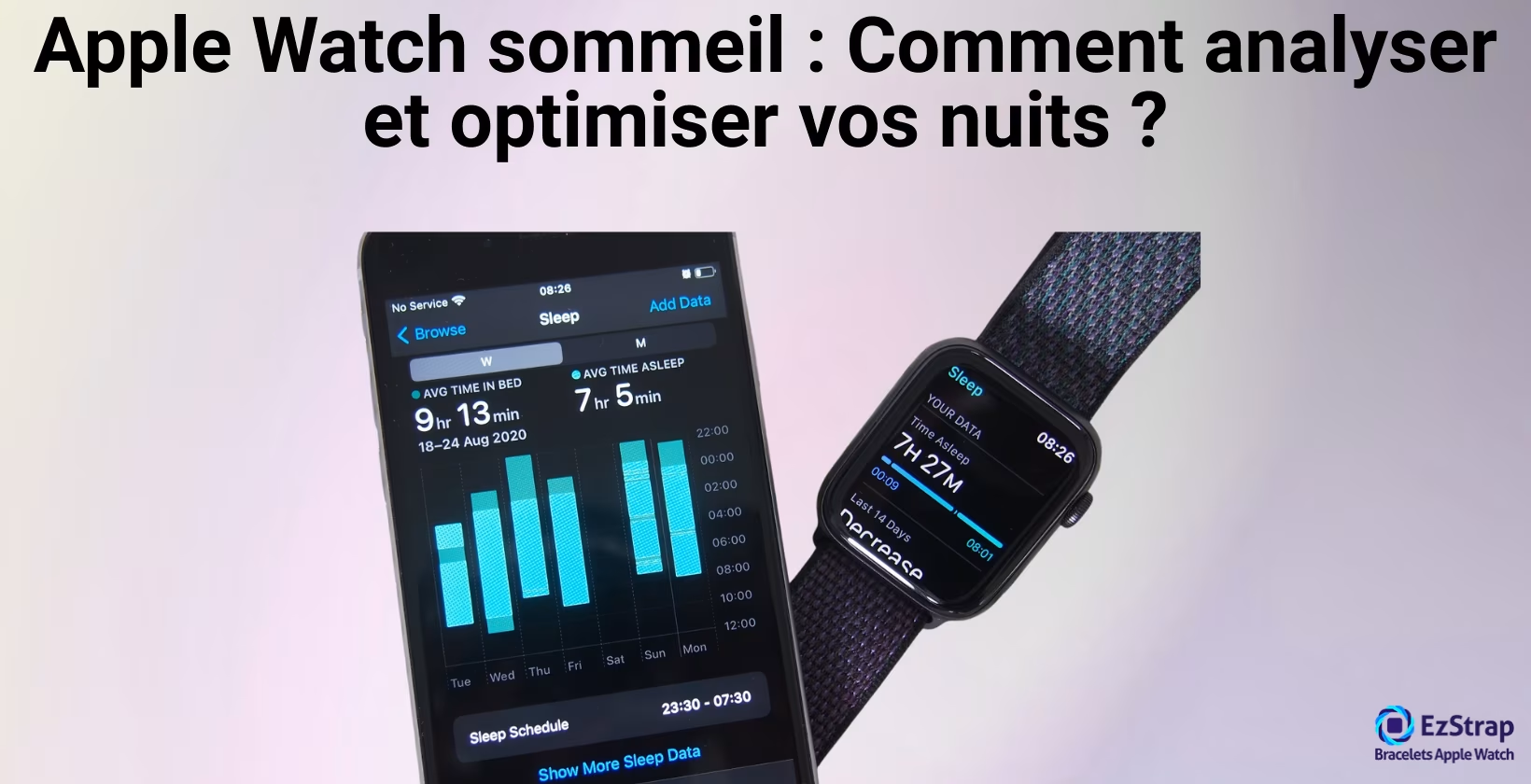
The Apple Watch Sleep app is a sleep monitoring system that automatically analyses hours and cycles of rest using the connected watch's built-in sensors (heart rate, respiratory rate, oxygen saturation, skin temperature, accelerometer).
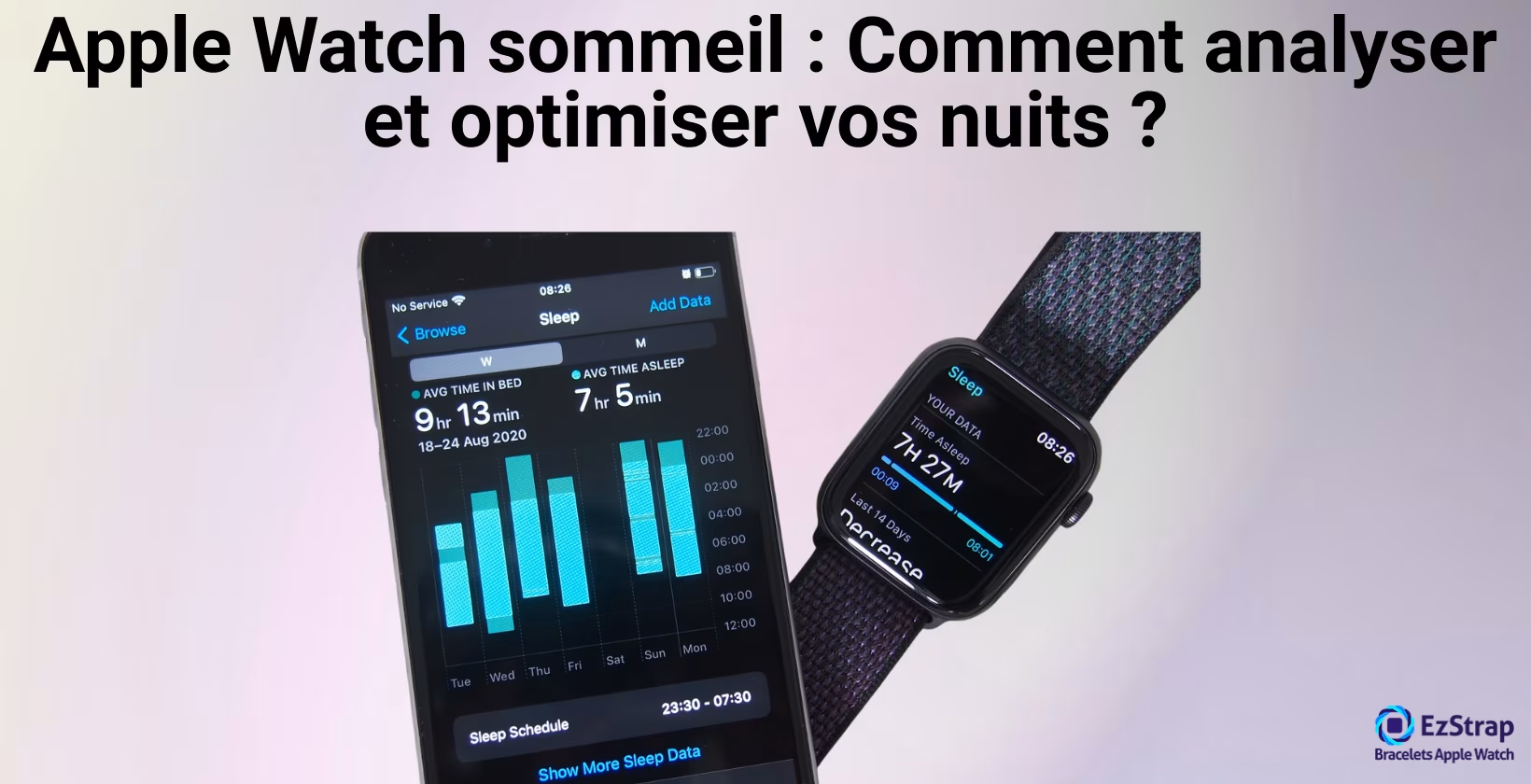
This system provides a sleep-tracking tool at a time when sleep disorders affect more than 30% of the French population, according to INSV and Santé publique France (2020 Sleep Barometer). Sleep tracking allows a preventive, educational approach to understanding your sleep rhythms without heavy medical equipment.
This guide explains how the Sleep and Vitals apps work, describes the 4 sleep stages (wake, REM sleep, light sleep and deep sleep) detected by the Apple Watch along with their recommended durations, and details the main physiological parameters measured (heart rate, respiratory rate, oxygen saturation, temperature).
We will look at how to set your sleep windows, and which methods to use to optimise and make the calculated sleep scores more reliable. The differences from medical polysomnography will be explained, along with the free third-party apps to use alongside the sleep tracking app.
What is the Sleep app on the Apple Watch?
The Sleep app on the Apple Watch is a built-in overnight tracking tool that automatically analyses rest cycles using the connected watch's embedded sensors. Launched with watchOS 7 in September 2020, it turns the Apple Watch into a consumer sleep tracker that uses the accelerometer, the heart rate sensor, respiratory rate, oxygen saturation, temperature and machine learning algorithms to detect the different sleep stages without any manual input from the user.
Recent studies, notably the one conducted by Roomkham and colleagues (2019) in collaboration with the Stanford Center for Sleep Sciences and Medicine under the supervision of Dr Emmanuel Mignot, show that the Apple Watch reaches an accuracy of 97% for sleep vs wake detection and a sensitivity of 99% compared with clinically validated actigraphs. This technology meets a growing need for sleep self-monitoring.
The Apple Watch Sleep app relies on several built-in sensors that continuously collect physiological data throughout the night:
- Accelerometer: detects micro-movements and changes in position
- Heart rate sensor: measures variations in heart rhythm linked to the different sleep stages
- Respiratory rate sensor: estimates the number of breaths per minute during sleep
- Skin temperature sensor (on recent models): records variations in night-time body temperature
This data is analysed by artificial intelligence algorithms developed by Apple and validated in a study by Apple Inc. (September 2023), "Estimating Sleep Stages from Apple Watch". The validation study included 299 nights of data from 166 participants wearing an Apple Watch and undergoing polysomnography (PSG) at the same time, giving a mean kappa coefficient of 0.63 for the classification of the four sleep stages.
Integration with the Health ecosystem
The Sleep app connects automatically to the Health app on iPhone, making it possible to build a complete history of sleep data that can be viewed on your smartphone and iPad. This makes it possible to relate it to other health metrics such as physical activity, resting heart rate and heart rate variability (HRV).
The data collected includes:
- total sleep duration
- the time it takes to fall asleep
- the number of night-time awakenings
- the regularity of bedtimes and wake-up times
Providing an overview of sleep hygiene.
What is the Vitals app on the Apple Watch?
The Vitals app on the Apple Watch is a continuous physiological monitoring system that automatically measures and analyses vital signs during sleep and while awake. This app, available since watchOS 11 (September 2024), simultaneously collects heart rate, respiratory rate, oxygen saturation (SpO₂) and skin temperature to provide a complete overnight assessment of the user's physiological state.
The reliability of this technology was verified by the Apple Heart Study: "Large-Scale Assessment of a Smartwatch to Identify Atrial Fibrillation", Dr Mintu Turakhia, Stanford University School of Medicine (November 2019). The study included 419,297 participants over 8 months, showing 84% concordance between irregular heart rhythm notifications and atrial fibrillation.
Which sleep stages does the Apple Watch measure?
When tracking sleep, the Apple Watch distinguishes several well-defined stages, making it possible to analyse the quality and structure of sleep. Here are the different stages measured.
- Awake
- REM (paradoxical) sleep
- Light (slow) sleep
- Deep sleep
1. Awake
Wakefulness is a state of consciousness characterised by fast, desynchronised cortical activity. According to AASM criteria, it is defined by the presence of alpha waves (8–13 Hz) in the occipital region when the eyes are closed, or beta activity (>13 Hz) when the eyes are open, and by the absence of the features specific to sleep (theta, delta, spindles, K-complexes).
Duration and occurrence of micro-awakenings
According to sleep physiology studies, micro-awakenings last on average from a few seconds to several minutes and occur naturally several times a night in healthy adults, according to the American Academy of Sleep Medicine classification.
Detection by the Apple Watch
The Apple Watch detects wakefulness by analysing the accelerometer together with variations in heart rate picked up by photoplethysmography (PPG). The app uses machine learning algorithms to identify the movement and heart rate patterns characteristic of wakefulness.
What is the ideal duration of the awake stages during sleep?
The cumulative time spent awake should ideally represent less than 10% of total sleep time, i.e. 40 to 50 minutes for a night of 7 to 8 hours. According to the National Sleep Foundation and sleep research studies, this threshold ensures low sleep fragmentation and good continuity, which are essential for cognitive and physical recovery.
2. REM (paradoxical) sleep
REM sleep is a sleep stage during which the brain is active, with rapid eye movements despite almost complete muscle atonia. This stage is defined by the American Academy of Sleep Medicine (AASM) and described in sleep medicine textbooks. This stage is essential for memory consolidation and emotional regulation.
- Brain activity: Brain activity during REM sleep shows low-amplitude, high-frequency waves similar to wakefulness, observed on the electroencephalogram (EEG), suggesting intense neuronal activity.
- Rapid eye movements: Rapid eye movements (REM) are characterised by repeated jerks of the eyes, measured in laboratory polysomnography as a key marker of this stage.
- Muscle atonia: It stops you from "acting out your dream" and corresponds to the motor inhibition produced by the brainstem, as confirmed by electromyographic recordings.
- Detection by the Apple Watch: The Apple Watch detects REM sleep by combining analysis of heart rate variability with analysis of the micro-movements picked up by the accelerometer. According to a technical report published by Apple Inc (September 2023), "Estimating Sleep Stages from Apple Watch", validated on 166 participants, the Apple Watch detects REM sleep mainly through analysis of the micro-movements recorded by the accelerometer, including those linked to breathing.
What is the ideal duration of REM sleep?
The ideal duration of REM sleep is between 20 and 25% of total sleep time, or roughly 1.5 to 2 hours for a night of 7 to 8 hours.
This recommendation is based on National Sleep Foundation guidelines and sleep physiology research showing that REM sleep typically accounts for 20-25% of total sleep in adults to optimise memory consolidation and emotional regulation.
3. Light (slow) sleep
This stage is a transition between wakefulness and deep sleep. It is divided into two stages: N1, marked by low-amplitude brain activity (4 to 7 Hz waves), and N2, characterised by the appearance of sleep spindles and K-complexes. During this stage, brain activity gradually slows down.
- Stage N1: Stage N1 is the transition between wakefulness and sleep, lasting 2-5% of total sleep time according to sleep physiology studies.
- Stage N2: Stage N2 makes up most of light sleep, accounting for 45-55% of total sleep time in adults according to the AASM.
- Physiological transition: Heart rate and body temperature gradually fall during these stages.
What is the ideal duration of light (slow) sleep?
The ideal duration of light (slow) sleep (N1 + N2) should represent around 50 to 60% of total sleep time, i.e. 3.5 to 5 hours for a night of 7 to 8 hours. According to American Academy of Sleep Medicine consensus statements and sleep physiology studies, it is the predominant stage, essential for the transitions between wakefulness, deep sleep and REM sleep.
4. Deep sleep
Deep sleep (stage N3) is a sleep stage characterised by the presence of large-amplitude delta waves and a weak response to outside stimuli, as defined by the AASM (American Academy of Sleep Medicine). It plays a crucial role in physical recovery, the release of growth hormone and the strengthening of the immune system. The notable facts about deep sleep are as follows.
- Delta waves: Deep sleep is characterised by the presence of delta waves (0.5–2 Hz) on the electroencephalogram (EEG), reflecting maximum synchronisation of neuronal activity.
- Physical recovery: The body uses this stage to increase the secretion of growth hormone, which helps repair muscle and bone tissue.
- Slowed heart rate: Heart rate falls significantly compared with resting heart rate, promoting cardiovascular recovery.
- Low reactivity: The threshold of sensitivity to outside noises and movements is at its highest during deep sleep, which is why it is hard to wake up spontaneously during this stage.
What is the ideal duration of deep sleep?
The ideal duration of deep sleep (stage N3) typically represents 10 to 20% of total sleep time, i.e. roughly 1 to 1.5 hours for a night of 7 to 8 hours. According to American Academy of Sleep Medicine (AASM) recommendations and sleep physiology studies, this stage is essential for physical recovery and cellular repair. Independent studies have shown that the Apple Watch reaches an accuracy of about 60 to 65% for detecting deep sleep, compared with polysomnography.
Which vital signs does the Apple Watch measure during sleep?
During sleep, the Apple Watch automatically records several essential vital signs to give an overview of your night-time health.
- Heart rate
- Respiratory rate
- Oxygen saturation (SpO₂)
- Skin temperature
1. Heart rate
Heart rate is the number of heartbeats per minute measured during sleep by the Apple Watch using photoplethysmography (PPG). This technology uses green LEDs and photodiodes to measure variations in blood flow at the wrist.
Measurement technology
Photoplethysmography with green LEDs lights up the skin, and a photodetector analyses the variations in reflected light linked to blood flow.
Normal ranges
Normal night-time heart rate generally varies between 40 and 70 bpm at rest according to physiological data.
Importance of monitoring
Monitoring night-time heart rate makes it possible to identify anomalies such as excessive bradycardia (< 40 bpm) or tachycardia (> 100 bpm), potential signs of cardiovascular disorders.
2. Respiratory rate
Respiratory rate is defined by the number of breathing (inhalation–exhalation) cycles per minute. This measurement is based on analysis of chest movements by the Apple Watch's accelerometer.
- Detection method: The accelerometer picks up the micro-movements of the wrist caused by the chest expanding and contracting, and deduces each breathing cycle from them.
- Normal ranges: Normal night-time respiratory rate lies between 12 and 20 cycles per minute according to medical standards.
- Value of monitoring: Monitoring respiratory rate makes it possible to detect anomalies such as bradypnoea (< 12 cycles/min) and tachypnoea (> 24 cycles/min), which may indicate sleep apnoea or respiratory distress.
3. Oxygen saturation (SpO₂)
Oxygen saturation (SpO₂) is the percentage of oxygenated haemoglobin in the blood measured by the Apple Watch during sleep, using red and infrared photoplethysmography (PPG).
Measurement technology
The Apple watch emits red and infrared light beams and analyses the light absorbed by oxygenated and deoxygenated haemoglobin.
Normal ranges
The norm for night-time SpO2 is 95%–100% according to medical standards.
Value of monitoring
Monitoring SpO2 makes it possible to identify episodes of hypoxia (SpO2 < 90%) that may reveal respiratory disorders such as sleep apnoea.
4. Skin temperature
Skin temperature is the measurement of heat at the surface of the skin. It is recorded by the Apple Watch during sleep using two temperature sensors built into Apple Watch Series 8 and later, Ultra and later, and Series 9 and later.
- Detection method: The temperature sensor measures thermal variations in contact with the skin of the wrist.
- Normal ranges: normal night-time skin temperature is between 32°C and 35°C according to physiological data.
- Importance of monitoring: monitoring skin temperature makes it possible to detect circadian variations and anomalies associated with sleep cycle disorders, revealing thermoregulatory disturbances or fever.
How do you set up sleep tracking?
This turns on automatic overnight data collection and lets you define a suitable sleep schedule. Prerequisites: an iPhone running iOS or later and an Apple Watch running watchOS 8 or later.
- Open the Health app on the iPhone.
- Go to the Browse tab, then to the Sleep section.
- Tap Set Up under "Sleep Schedules" to set your bedtimes and wake-up times for weekdays and weekends.
- Turn on the Track Sleep with Apple Watch switch to force the Apple Watch into Sleep mode as soon as the scheduled period begins.
- On the Apple Watch, open the Sleep app, scroll down and make sure that Sleep Mode is turned on.
- In the watch settings, adjust the Sleep Focus mode, which silences notifications and dims the screen. Wear the Apple Watch on your wrist all night, neither too loose nor too tight, to ensure the sensors are accurate. Each morning, check your sleep results in the Health app: total duration, stages and recorded vital signs.
Do you need to turn on Sleep mode to track your nights?
Yes, Sleep mode must be turned on for the Apple Watch to record your nights automatically.
Apple's official documentation states that, to benefit from sleep tracking on the Apple Watch, you need to create a sleep schedule in the Health app on iPhone and turn on the Track Sleep with Apple Watch option. Without this, the watch does not switch to an optimised sleep mode and only collects sparse movement and vital sign measurements, which can undermine the reliability of the sleep data.
How do you set your sleep schedule (weekdays and weekends)?
Setting up your sleep schedule lets you define different bedtimes and wake-up times for weekdays and weekends, and turn on the smart alarm as well as the Sleep and Sleep Focus modes.
Prerequisites: iPhone running iOS 17+, Apple Watch running watchOS 8+
- Open the Health app on your iPhone.
- Go to Browse > Sleep, then tap Sleep Schedules.
- Set the bedtime and the wake-up time for each day of the week by dragging the sliders.
- Tap Add Schedule to create a different timetable for the weekend, and adjust the bedtimes and wake-up times.
- Configure the alarm options: turn the Alarm on or off and choose the sound, vibrations and volume you want via Sounds & Haptics.
- Turn on Track Sleep with Apple Watch so that the watch switches to Sleep mode as soon as the time window begins.
- Turn on the Sleep Focus mode (formerly Night mode) to limit notifications and dim the screen automatically during the sleep window.
- Make sure in the Health app that each schedule is present under Sleep Schedules and that all the options (automatic tracking, Focus mode) are turned on.
Does the Apple Watch detect naps?
Yes, from watchOS 11, the Apple Watch can detect and record naps automatically.
This feature uses the motion sensors and sleep detection algorithms to identify a nap without you turning on Sleep mode manually. Automatic nap detection complements night-time tracking to give an overall picture of sleep habits.
How do you use the Apple Watch to improve your sleep?
Using your Apple Watch to improve your sleep means setting up tracking, analysing each metric (stages + vital signs) and applying targeted adjustments. Check that you have turned on Sleep mode and Track Sleep with watchOS 8+.
- Set up your sleep schedule (times, smart alarm, Sleep mode) in the Health app as described above.
- Each morning, open the Sleep app in Health to see:
- Duration and % light/deep/REM sleep
- Average HR and variability (HRV)
- Respiratory rate
- Average SpO₂
- Night-time skin temperature
- If SpO₂ is often < 92%: see a doctor, as this may indicate sleep apnoea or other respiratory disorders requiring a professional diagnosis.
- If night-time heart rate is high (> 70 bpm): use relaxation techniques before sleeping and avoid stimulants (coffee, screens) 2 h before going to bed.
- If respiratory rate is irregular (> 20 cycles/min): see a doctor to rule out sleep apnoea and practise relaxing breathing exercises.
- If skin temperature varies significantly:
- Too high: air the bedroom, use light sheets.
- Too low: warm the environment slightly (18–20°C).
- If REM is low (< 20%) → keep to a regular sleep schedule and avoid alcohol, which suppresses REM.
- If deep sleep is low (< 10%) → increase moderate physical activity during the day; exercise promotes deep sleep.
- Adjust according to weekly trends: if your metrics improve consistently, keep up your current habits.
- Use bedtime reminders and Wind Down to build a regular routine, which is essential for sleep quality.
Can the Apple Watch calculate a sleep score?
Yes, the Apple Watch calculates a unified sleep "score" since watchOS 26 (September 2025).
The sleep score is out of 100 points and combines sleep duration (50%), bedtime consistency (30%) and night-time interruptions (20%) into a rating ranging from "Very Low" to "Excellent".
The reliability of this data rests on the Apple Watch's biometric sensors. A 2024 study by Dr Rebecca Robbins and team, Brigham and Women's Hospital and Harvard Medical School, comparing three consumer devices (Oura Ring, Fitbit Sense 2, and Apple Watch Series 8) with polysomnography showed that all the devices reach more than 90% agreement for sleep vs wake detection, with variable performance for sleep stage classification.
As the sleep score is not available on older-generation Apple Watch models, you will need a recent Apple Watch to benefit from this feature. You can read our complete Apple Watch buying guide if you want to compare the models currently available and make the right choice.
What is the difference between Apple Watch sleep tracking and a medical test (polysomnography)?
Polysomnography is a medical examination carried out in a sleep laboratory under the supervision of a technician. It uses EEG (electroencephalogram), EMG (electromyogram) and EOG (electrooculogram) sensors, respiratory sensors, a pulse oximeter and an infrared camera to record brain, muscle, eye, respiratory and cardiac activity and movements simultaneously.
The data obtained is analysed according to standardised criteria (stages N1, N2, N3 and REM) and interpreted by a neurologist or a sleep specialist. The American Academy of Sleep Medicine has validated polysomnography as the reference for diagnosing sleep disorders.
The table below compares the advantages and limitations of sleep tracking with the Apple Watch and with polysomnography.
| Method | Pros | Cons |
|---|---|---|
| Apple Watch | Continuous, mobile monitoring at home Measurement of heart rate, respiratory rate, SpO₂ (compatible models), skin temperature (compatible models) and movement Setting up of schedules, bedtime reminders and alarms Integration with the Health app and daily feedback Affordable cost and simple to use | Accuracy varies by stage (very good for sleep vs wake; more limited for deep/REM) No EEG/EMG/EOG sensors Cannot provide a medical diagnosis Depends on the device being worn properly |
| Polysomnography | Direct recording of brain and muscle activity (EEG/EMG/EOG) Gold standard for a precise medical diagnosis Reliable detection of apnoeas and other disorders Interpretation by sleep specialists | Carried out in a laboratory (artificial environment) High cost and limited access One-off sessions (no daily tracking) Restrictive, with many sensors |
Can the Apple Watch detect sleep apnoea?
Yes, Apple Watch Series 9 and later and Apple Watch Ultra 2 and later can screen for signs of sleep apnoea, with a feature approved by the FDA in 2024.
This feature relies on the accelerometer to analyse night-time breathing movements over 30 consecutive nights: if at least 10 nights show breathing-interruption events rated "elevated", the watch may send a notification suggesting you consult a healthcare professional. These algorithms have been clinically validated and allow non-invasive screening at home, but they do not replace a professional medical diagnosis.
To find out more on this subject, feel free to explore our article on sleep apnoea.
Is it risky to sleep with your Apple Watch?
No, for the vast majority of users, sleeping with your Apple Watch poses no danger.
Wearable devices such as the Apple Watch emit extremely low levels of radio frequency (RF) that comply with the strict exposure standards of the FCC and international bodies. No credible scientific evidence has linked this non-ionising radiation to adverse health effects at the levels emitted by these devices.
On the other hand, rare skin reactions (redness, rashes) are possible in people who are sensitive to band materials, especially if the band is worn too tight and cleaning is insufficient. To minimise these risks, keep a comfortable fit, clean the watch and your wrist regularly, and get yourself a good-quality Apple Watch band.
Which third-party apps measure sleep quality?
Several third-party apps use the Apple Watch's sensors to offer a complementary analysis of sleep quality. Here is a selection of the most popular:
AutoSleep
Pros: app that works automatically and analyses sleep duration and stages without you starting tracking manually.
Strengths: automatic tracking calibration; heart rate variability (HRV) measurements; detailed scores; trend analysis.
Cons: interface sometimes complex; no built-in smart alarm.
Price: €3.99 for life.
Pillow
Description: App with automatic and manual tracking, audio recording of snoring.
Pros: smart alarm within an adjustable window; Apple Music integration; detailed weekly reports.
Cons: advanced features reserved for the premium subscription.
Price: Free with premium options at €4.99/month.
Sleep Cycle
Description: App focused on the smart alarm and analysis of sleep cycles.
Pros: interactive graphs of the stages; trend statistics; HomeKit compatibility.
Cons: limited free version; reliance on proprietary algorithms.
Price: Free with premium at €5.99/month.
Sleep++
Description: Free, open-source app for automatic or manual tracking.
Pros: entirely free; simple interface; respect for privacy.
Cons: basic features; no advanced analysis.
Price: Free.
The choice depends on your priorities: budget, level of detail wanted, specific features such as the smart alarm, or a preference for simplicity.
How can you make your Apple Watch battery last all night?
To optimise Apple Watch battery life during sleep tracking, here are the best practices:
- Charge to 100% before bed: Make sure the watch is fully charged.
- Turn on Low Power Mode: Settings > Battery > Low Power Mode while you sleep.
- Turn off Always On Display: Settings > Display & Brightness > Always On > Off. Saves about 15-20% of battery.
- Reduce the brightness: Set it to the lowest comfortable level (20-30%).
- Limit night-time notifications: Use the Sleep Focus mode to block non-essential notifications.
- Turn off optional measurements: If battery life is critical, temporarily turn off ECG and continuous SpO₂.
- Optimise the fit: A well-fitted band improves sensor accuracy and can reduce power consumption.
Tip: With these optimisations, a recent Apple Watch should easily last 8-10 hours of sleep tracking while using about 15-25% of the battery, depending on the model and the age of the battery.